Enclosure for the ZX80
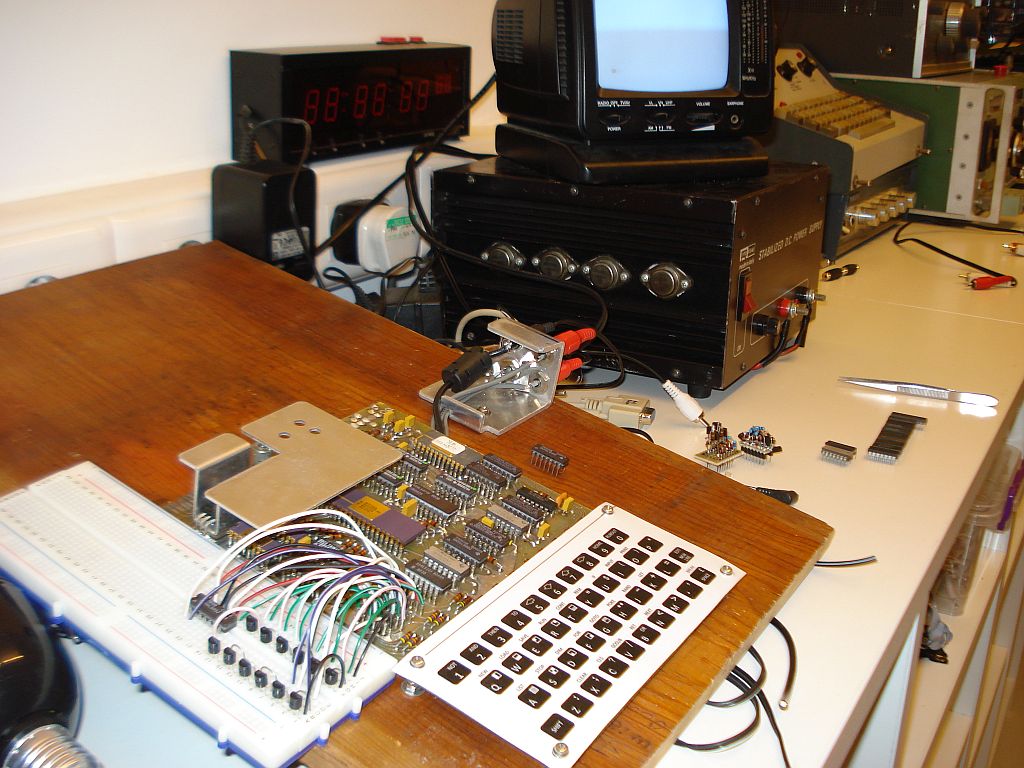
The ZX80 attached to its "enclosure", a nice wooden board. Please ignore the experimental circuits on the plastic breadboard.
An enclosure for the homebrown ZX-80? No matter what I have thought, I could not resist the joy of seeing the internals of the computer everytime I sit in front of it to program or play games. After all, the beauty of this machine the way built, is it's components. Seeing them, reminds me every time the good time I had building it and brings memories of the problems arised and the solutions given. I cannot hide all these under an ugly box, no way!
So what I did instead,
I got a large piece of solid wooden board that I got from a postage
enclosure of my lathe. This piece had naturally got old. This happens
when you use a wooden piece for many years, the wood color changes and
even the dirt on it gives a nice natural olderness. I drilled holes all
the way through onto this wooden piece, to match the holes of the ZX-80
motherboard and I used stainless steel screws to fit the motherboard in
place. I had to ensure that the expansion port will be a few milimetres
on top and spaced away of the wooden board, so that at least a ISA
connector would fit on it without hetting stuck on the wooden board. To
accomplish this, I used nuts onto the screws to create custom distance
spacers, so that the motherboard can be raised above the wooden board
at the desired distance. When the motherboard was fitted in place, the
mechanical stability was immediately seen. The ZX-80 sits firmly in
place and the key presses no more cause the computer to reboot due to
bad connection contacts that were previously caused by the movement and
slight bending of the motherboard. The wooden board I used was much
larger than the ZX-80 board. I did that because I had in mind the
possible expansion boards that could be fitted later on to the ZX-80
and also a tape drive I wanter to include with it. All these had to be
fitted onto the same piece of wooden board, so there are no cables
hanging around. Now, that would be almost a breadboard computer!
The ZX-80 used three
jack connectors for the audio input, the audio output and the power,
which were fitted onto the motherboard directly. I did not use these
connectors for various reasons. First all the connectors of this type I
found were of bad quality. In fact the original ZX-80 used bad quality
connectors and with the years passing the pins on these connectors were
corroded, making bad contacts and causing problems. The slightest
movement of the computer for example, could remove power from it, due
to a bad power jack connection and now you had to re-type your program
listing all the way from the beginning. Second, I could not find
connectors with the same PCB footprint that the ZX-80 motherboard uses.
To overcome these problems, I used external chassis-mounted connectors
for all these three ports, as well as the video output port and I
connected these to the motherboard with the use of thin coaxial cables
(even the power one). Just for making the setup looking better, I hide
these cables below the motherboard and I made the connections from the
bottom PCB layer. Mechanical stability of the connectors was provided
with a small but thick piece of aluminum sheet (It has to be 4 mm thick
or more), bent in a corner-shape and the connectors are screwed in.
This piece is then screwed onto the wooden board. I also added a
push-to-brake momentary switch onto this piece, which is connected
directly to the power jack. When pressing it, the power to the ZX-80 is
disconnected, so this switch was used as a reset switch, without having
to modify the ZX-80 itself. A reset switch is very useful, everytime
you want to restart the ZX-80 (for example on program crashes) so that
you do not have to unplug the power jack or the wall transformer all
the time. The connectors I used are RCA types, except from the power
jack, and they are manufactured by Switchcraft. I used RCA because it
is the standard in audio and video equipment, there are RCA to jack
adaptors or cables for PC connection and because the RCA provide lots
of contact area in the connections, so dirt and moisture won't be a
problem anymore.